Network Interfaces
The xPico 600 gateway contains the following configurable network interfaces: Wi-Fi Client (wlan0), Wi-Fi SoftAP (ap0), Ethernet (eth0). These interfaces are concurrently available for communication.
After applying the changes using one of the front-end management interfaces, the gateway operating system manages automatic connection management for the network interfaces without any further user or host controller intervention.
The gateway supports a number of different network topologies for the network interfaces.
LAN Uplink
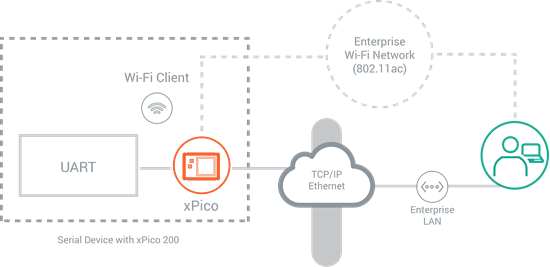
In this network configuration, xPico 600 uses the wlan0 and eth0 network interfaces as an uplink to the LAN. The connected device or gateway can communicate with different applications through any of these interfaces. The picture below provides a simplified view of this configuration:
Ethernet to Wi-Fi Bridging
When operating as a bridge, the device connects to the xPico 600 gateway via Ethernet, and it provides network access via Wi-Fi client interface (wlan0), or access to a mobile device via Wi-Fi SoftAP (ap0) interface. Bridging enables data communication along either of the following two paths (not concurrently):
- Ethernet to Wi-Fi Client
- Ethernet to SoftAP
Concurrent Wi-Fi SoftAP and Wi-Fi Client
In this network configuration, both the Wi-Fi interfaces (ap0 and wlan0) are active. Data communication occurs between the connected device or gateway and remote servers via the enterprise wireless network or with the wireless client devices associated with the SoftAP (ap0) interface.
Wi-Fi Client Only
In this network configuration, the Wi-Fi Client (wlan0) interface is the only interface enabled and communication occurs between the connected device or gateway and remote applications via the wireless network.
Wi-Fi SoftAP Only
In this configuration, the Wi-Fi Client (wlan0) is not active and communication only occurs between the connected device or gateway and the wireless client devices associated with the SoftAP (ap0) interface.
Configuring the Network Interfaces
The following sections describe each of the network interfaces:
- WLAN Client Interface (wlan0)
- SoftAP Interface (ap0)
- Ethernet Interface (eth0)
The network interfaces contain Interface and Link status, counters, and/or configuration settings:
- The status page shows the interface and link status on the device.
- The counters page shows current counter values.
- The Interface configuration page contains properties that are related to the IP layer associated with that network interface. The Link configuration page contains properties related to the data link layer (Layer 2) characteristics of that network interface.