Virtual Line Interface
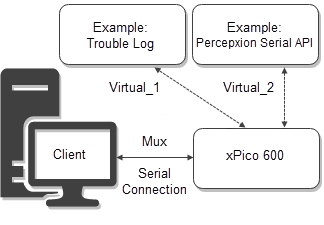
The virtual line interface sets up a virtual port on the Line 1 serial port. You can configure 2 virtual lines, 1 and 2, and define the protocol and other line settings.
Mux provides commands for sending and receiving data on multiple network connections. Mux offers simultaneous access to virtual lines and each virtual line may operate in any of the gateway's line protocols.
Use the serial terminal to open a virtual connection with Mux commands. The virtual connection establishes the configured Line protocol on the virtual port.
To send and receive data on the configured virtual line:
- Set the Line 1 protocol to Mux.
- Configure Line Virtual_1 or Virtual_2 to the desired protocol. For example, this could be Tunnel.
- Configure any other necessary settings for the protocol assigned to the virtual line. For example, configure Percepxion settings, etc.
- Use the serial terminal to open a virtual connection. The virtual connection establishes the configured Line protocol on the virtual port. See Mux Reference for details on Mux commands to create a virtual connection.
Virtual Line Configuration Settings
The following table describes the Web Manager Line configuration settings.
Links to the equivalent settings for the CLI and XML reference are listed below.
CLI settings: See Config Line Level
XML settings: See configgroup Line
| Virtual Line Setting | Description |
|---|---|
| Name | Name or short description for the line, if desired. By default, there is no name specified. A name that contains white space must be surrounded by quotations. May contain up to 25 characters. |
| State | Operational state of the serial line. Enabled or Disabled. The default is Enabled. |
| Protocol | Operational protocol for the Line. Choices are: - Command Line - Percepxion Interface - Modem Emulation - Monitor - Mux - None - Trouble Log - Tunnel. See Line Operating Modes. |