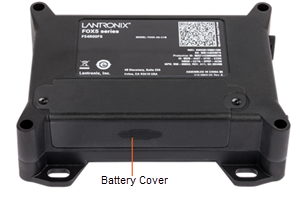
Assembling the Device
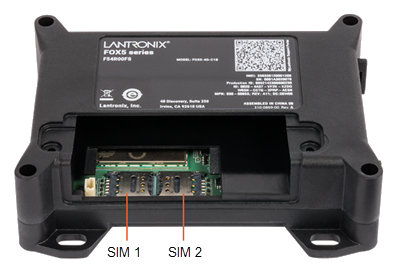
FOX5 devices have a Cellular modem that requires a pre-activated SIM card to access cellular network services. FOX5 devices provide two nano (4FF) SIM card holders. SIM1 is the default active SIM. You can switch SIMs using PFAL commands. For information about PFAL commands, refer to PFAL Command Reference (see Related Documents) and for instructions to execute them, see Workbench.
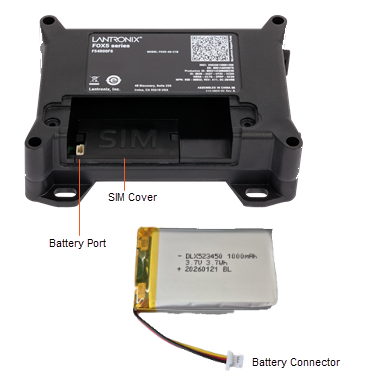
A 1000 mAh rechargeable battery is shipped with the FOX5 device. A port is available next to the SIM area to connect the battery.
To insert the SIM card and connect the rechargeable battery to the device:
-
Locate the SIM card holders in the SIM area of the device.
-
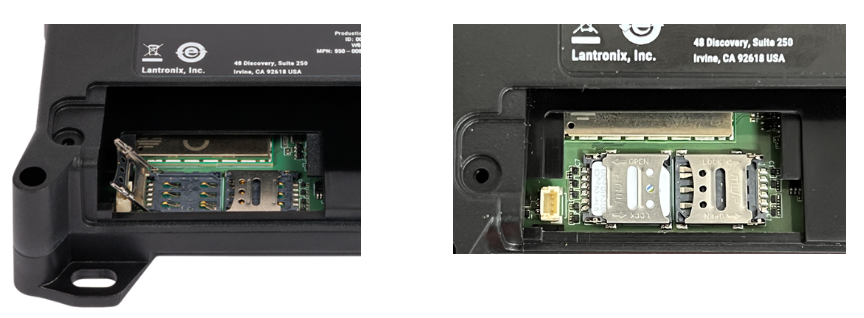
Select the required SIM card holder and slide the clip in the direction marked OPEN to release it, then flip it up.
- Place the SIM card in the SIM card holder with the contact side of the SIM card touching the pins and align the edges correctly.
-
Flip the clip back down, hold it pressed, and slide it in the direction marked LOCK until it locks in place.
-
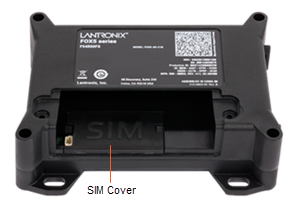
Insert the SIM cover in the bracket over the SIM area and push it into place.
-
Plug the battery connector into the battery port and the place the battery in the space above the SIM cover.
-
Put the battery cover in place and screw it down.